


FINALIZATION OF THE ORDER
On the screen below, you can finalize a new order or edit an existing one.
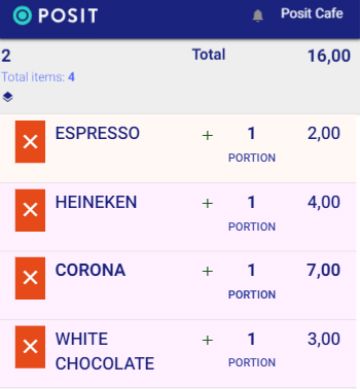
The "2" on the top left indicates the table number. If you tap on it, you will go to the screen with the initial order information, where you can make changes (service points, table, customer, room, etc.).
The "Total" is the total amount of the order. Tap on the amount to apply a discount if desired.
Below is the list of ordered items. Tap the "X" next to the items you want to remove. You can change the quantity and price of the product by tapping on the number and modifying it. If you want to change the parameters of a product, select the product, and the parameterization screen will appear. If you want to add more products, press the "+" button to go to the Pricelist. The same can be achieved by swiping the screen to the right.
When you have completed the order, press the checkmark button in the lower right corner to finalize it.